Network Automation Workbench
Contents
Concept
Orchestration platform that integrates the ANK ecosystem tools — Topology Generator, Network Modeling & Configuration Library, Network Simulator, Network Visualization Engine — into a single web interface. Engineers define topologies, generate configurations, run simulations, and inspect results without switching between CLI tools.
┌──────────────────────────────────────────────────────────────────┐
│                  Network Automation Workbench                    │
│         (Orchestration · Web UI · Workflow Management)           │
│   ┌──────────────┬──────────────┬──────────────┬──────────────┐ │
│   │   TopoGen    │  [ank-pydantic](../ank-pydantic)│   Simulator  │    NetVis    │ │
│   └──────────────┴──────────────┴──────────────┴──────────────┘ │
└──────────────────────────────────────────────────────────────────┘
The workflow follows a linear pipeline: generate or model a topology, run a simulation against it, visualize the results, and export device configurations. Each stage delegates to a specialized tool; the workbench coordinates the handoffs and presents a unified project context across all stages.
Technical Reports
- Download Research Paper: paper.pdf
- Download Research Paper: workbench-usermanual.pdf
- Download Research Paper: techreport.pdf
Features
Topology Editing. Drag-and-drop device placement on a canvas. Hold Shift and drag to draw links between nodes. YAML editor with live validation alongside the visual editor.
Configuration Generation. Generate device configurations from models with syntax-highlighted preview. Download individual configs or batch-export as .zip. Arista EOS and Cisco IOS-XR support.
Simulation Control. Start, stop, and reset the Network Simulator with a lifecycle state machine. Protocol event timeline shows OSPF, IS-IS, and BGP convergence. Click any node for interactive terminal via WebSocket relay.
Visualization. Explore topology, physical, logical, and protocol layers. Routing table inspection per device. Export to SVG and PDF.
Container Lab Integration. Deploy topologies to Container Lab for full device emulation. Lifecycle management, orphan detection, and click-to-terminal access.
CI/CD & IaC Export. Export GitOps bundles with GitHub Actions/GitLab CI pipelines. Generate Terraform HCL and Ansible playbooks.
Command Palette. Cmd+K for keyboard-driven access to exports, pipeline runs, and navigation.
Current Status
Last shipped: v4.2 UX Polish & Accessibility — shipped 2026-03-04 Ready to plan: Maintenance & Feature Backlog
Quick Facts
| Status | Recently Updated |
| Stack | Python, TypeScript |
What This Is
An orchestration platform that integrates the ANK ecosystem tools (TopoGen, ank_pydantic, Network Simulator, NetVis) into one seamless workflow.
ANK Workbench is the glue layer that coordinates the entire network automation pipeline. Engineers can generate topologies, model networks declaratively, run lightweight simulations, and visualize results—all from a unified web interface. No more context switching between separate tools or manually stitching components together.
The Integration Vision:
┌──────────────────────────────────────────────────────────────────┐
│                        ANK Workbench                             │
│         (Orchestration · Web UI · Workflow Management)           │
│   ┌──────────────┬──────────────┬──────────────┬──────────────┐ │
│   │   TopoGen    │ [ank_pydantic](../ank_pydantic) │   Simulator  │    NetVis    │ │
└───┴──────────────┴──────────────┴──────────────┴──────────────┴─┘
Workflow: Generate/model topology → Run simulation → Visualize results → Export configs Value: Complete pipeline in one interface, no tool-switching or manual integration
Core Value
Network engineers can design, validate, and visualize network changes in one complete workflow without switching between separate tools or manually gluing components together.
Screenshots
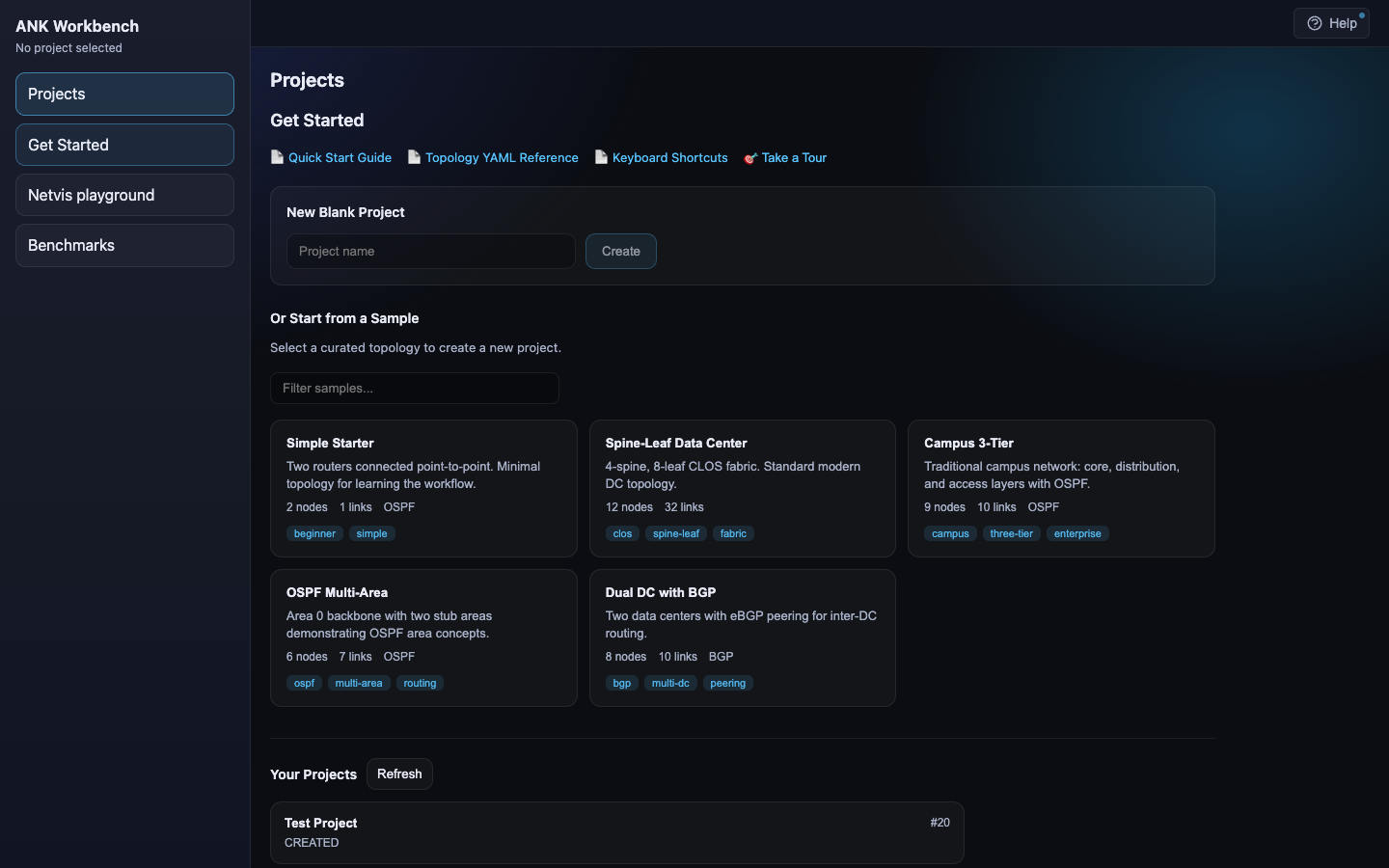 Projects landing page — create from scratch or start from curated sample topologies (spine-leaf, campus, OSPF multi-area, dual DC with BGP).
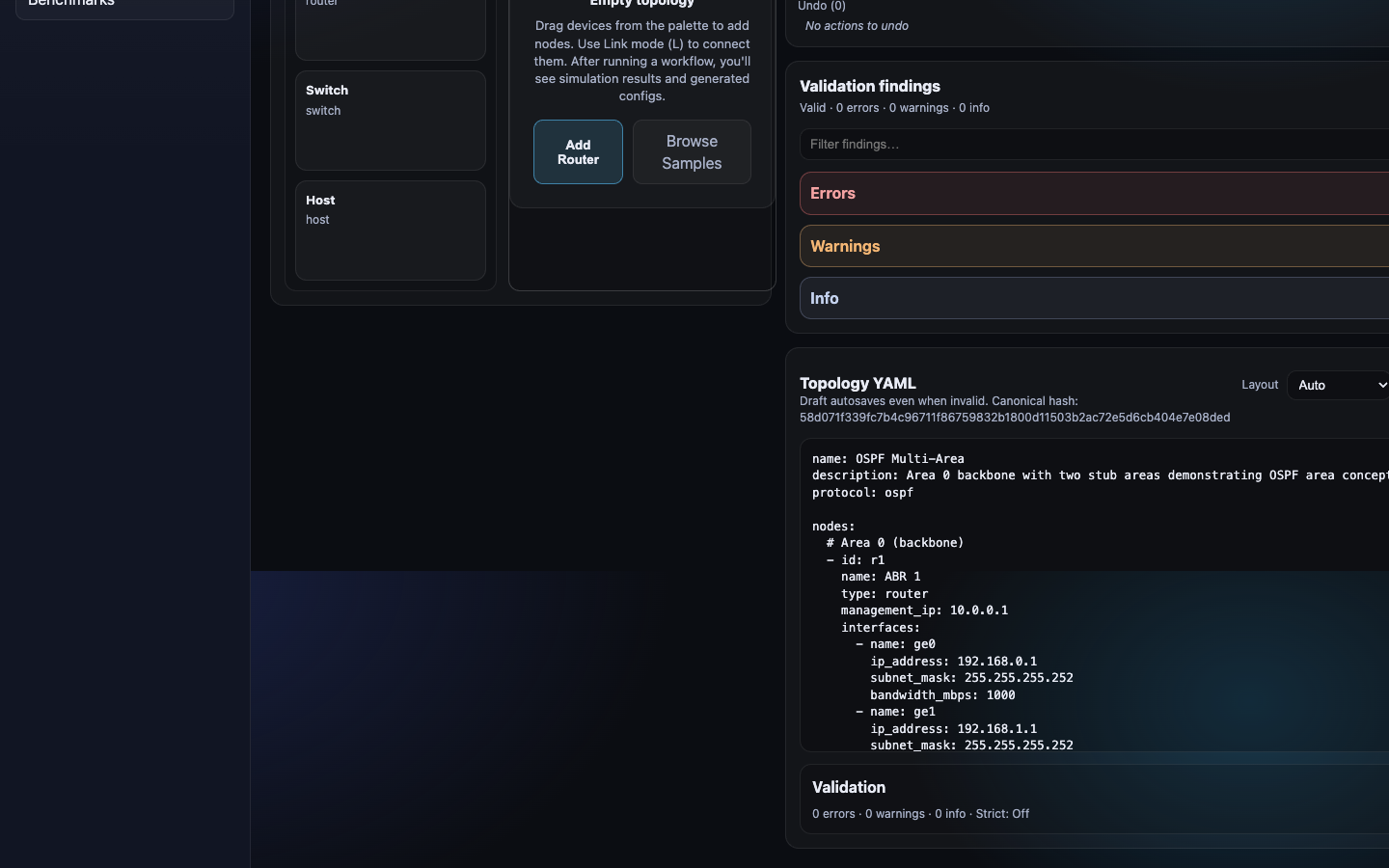 Topology editor — drag devices from the palette, edit YAML directly with live validation, and browse sample configurations.
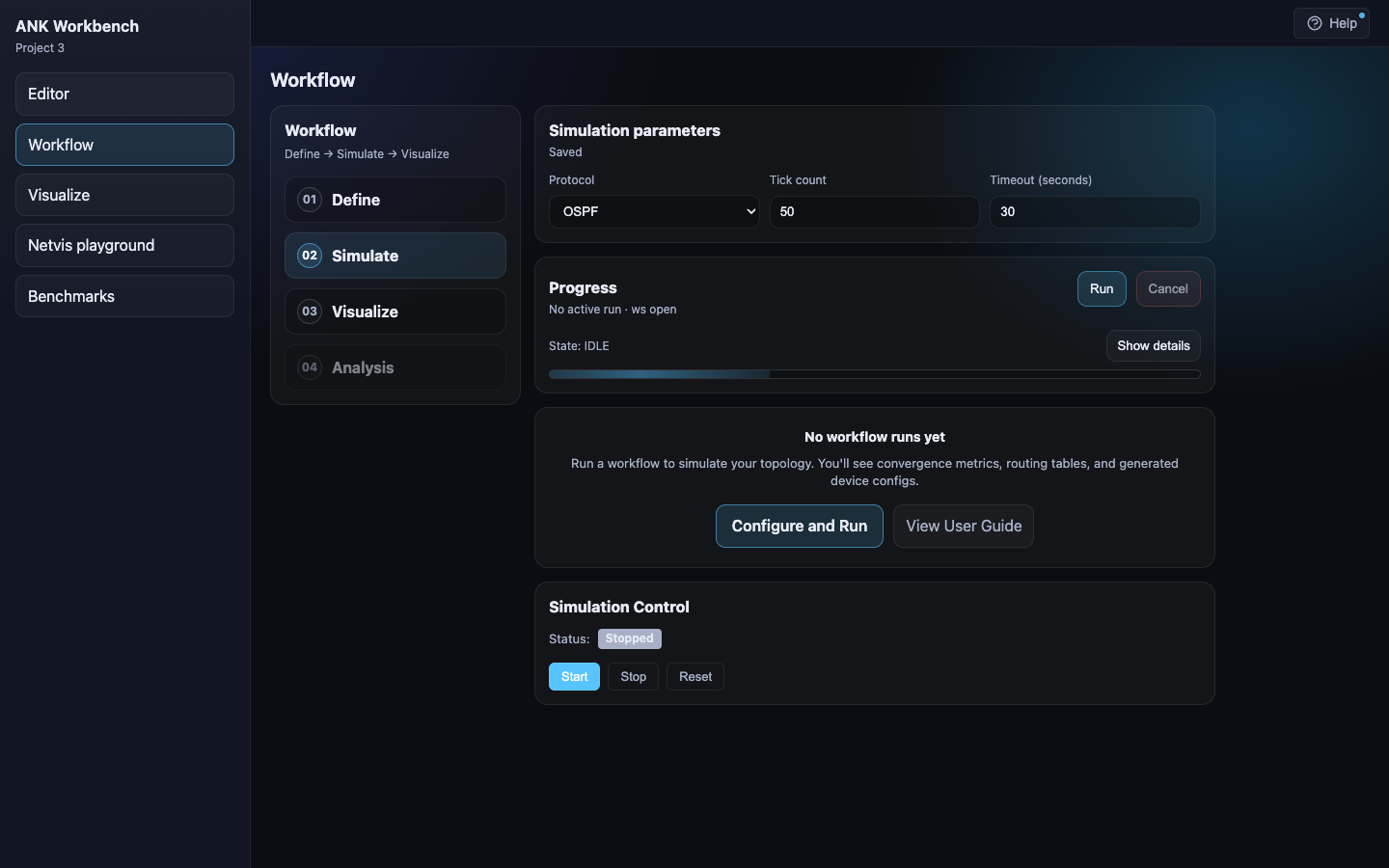 Workflow view — configure simulation parameters (protocol, tick count, timeout), run simulations, and control the simulator lifecycle.
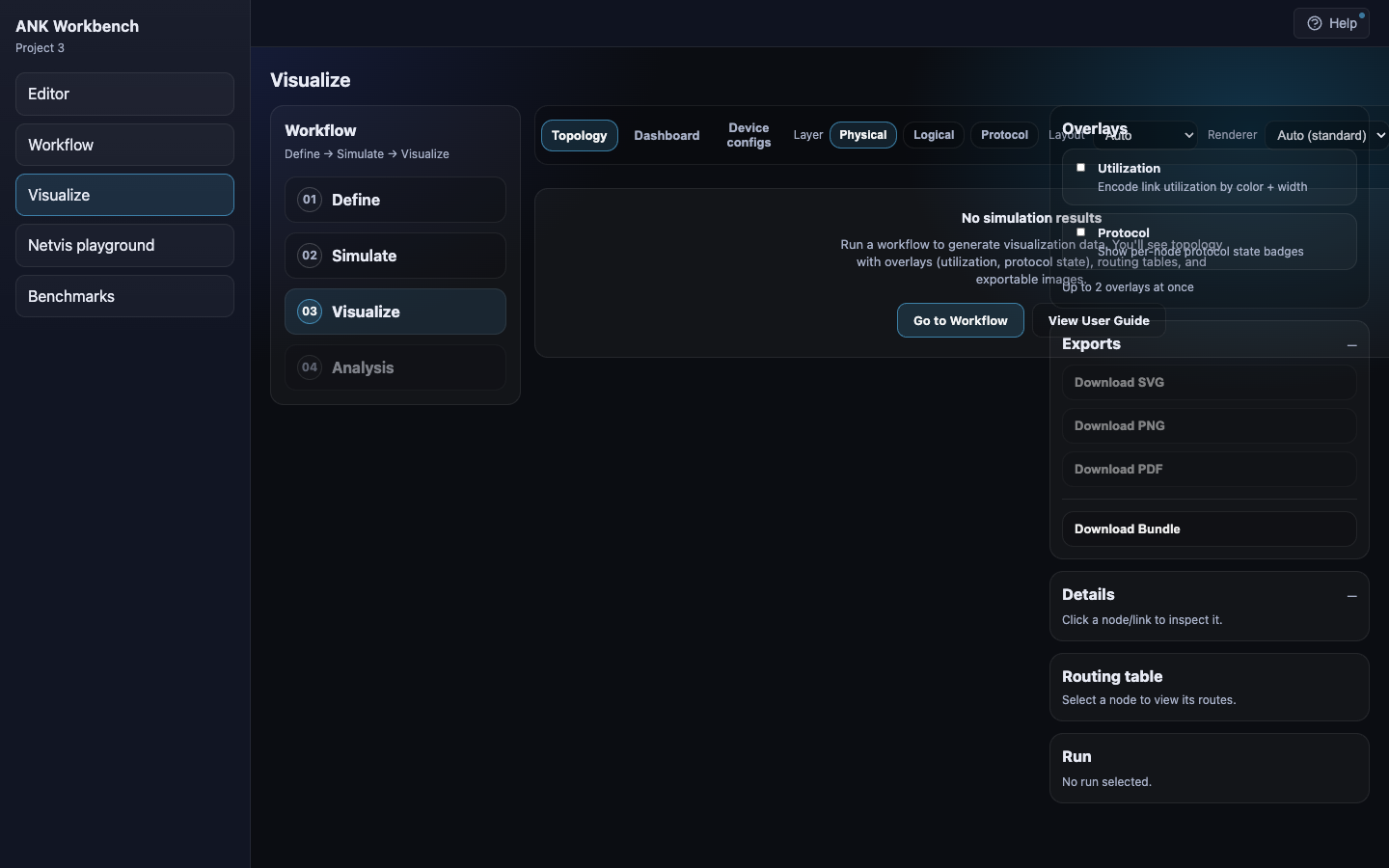 Visualization view — explore topology, physical, logical, and protocol layers with configurable overlays, routing table inspection, and multi-format export.
Current Milestone: Ecosystem Maintenance & Operations
Goal: The ANK Workbench is now functionally complete, type-safe, and covered by end-to-end testing. The project enters a maintenance phase, waiting for future strategic shifts like an AI-driven Model Context Protocol (MCP) server or real-time collaborative editing.
Target features:
- All 93 phases across the 5 major milestones have been completed.
- The project is now in a maintenance and operational state.
What We’ve Built
# v4.2 UX Polish & Accessibility (Complete)
| Delivered: March 4, 2026 | Phases: 4 (90-93) |
Transformed the Workbench from a powerful engineering tool into a polished, professional-grade product by improving developer experience (DevEx) and user interfaces:
- Toast Notifications: Replaced blocking native browser popups with modern, sleek
sonnerslide-in notifications. - Global Command Palette: Activated a
Cmd+Kpalette that allows power users to instantly trigger CI/CD exports and pipeline runs without using a mouse. - Visual Link Drawing: Upgraded the
NetVisCanvasinteractions to allow engineers to hold Shift and drag wires between nodes, automatically generating the underlying logical interfaces. - Contextual Tooltips: Embedded educational hover-cards explaining the advanced mathematical parameters.
# v4.1 Codebase Hygiene & Stability (Complete)
| Delivered: March 4, 2026 | Phases: 3 (87-89) |
Solidified the foundation of the ANK Workbench after rapid feature development, ensuring long-term maintainability, type safety, and bug-free operation:
- Strict Static Type Checking: Conducted a deep
mypypass across the backend orchestrator, eliminating over 200 type warnings, circular dependencies, and runtime attribute errors. - Code Deduplication: Purged unused legacy components and endpoints, reducing the frontend bundle size and eliminating zombie UI code.
- End-to-End Testing: Initialized Playwright and implemented automated browser testing covering the critical paths.
# v4.0 Production Intent & Orchestration (Complete)
| Delivered: March 4, 2026 | Phases: 3 (84-86) |
Graduated the Workbench from a testing/lab environment into a true orchestrator capable of pushing final states into IaC repositories and enterprise CI/CD pipelines:
- CI/CD Pipeline Abstraction: Provided an “Export to CI” modal allowing users to download GitOps bundles with automatically generated GitHub Actions and GitLab CI validation pipelines.
- IaC Generation: Implemented intelligent generators that translate the internal logical topologies into declarative Terraform HCL models and Ansible configuration management playbooks.
- Enterprise RBAC: Introduced JWT-based Role-Based Access Control, explicitly gating “Deploy” actions to Designers/Approvers and “Export to CI” actions exclusively to Approvers/Admins, protecting production infrastructure.
# v3.2 Advanced Analytics & Optimization (Complete)
| Delivered: March 4, 2026 | Phases: 3 (81-83) |
Integrated dynamic performance analysis and multi-host scaling capabilities, allowing engineers to validate hardware constraints before purchasing:
- Deep netflowsim Integration: Exposed the advanced v2.0 Rust engine to run massive Monte Carlo simulations with customizable queuing models (Pareto, LogNormal). Added interactive UI components for percentiles, bottlenecks, and linear capacity projections.
- Distributed Multi-Host Execution: Modified the
TopologyGeneratorand orchestration layer to automatically slice topologies, allocate VXLAN tunnels, and deploy container instances concurrently across multiple target Docker daemons. - Resource & Capacity Pre-flight: Implemented intelligent pre-flight capacity validation that sums node requirements and queries actual host hardware, providing a protective modal to warn against or block oversubscribed deployments.
# v3.1 NetAuto Manifest & Remediation (Complete)
| Delivered: March 4, 2026 | Phases: 4 (77-80) |
Pivoted towards the [automationarch](../automationarch) ecosystem architecture by introducing standard YAML manifests, external provider imports, and actionable dissonance remediation:
- NetAuto Manifest Persistence: Seamlessly save/open project state via
netauto.projectYAML files instead of pure SQLite. - External Provider Import: Bootstrap topologies directly from external Git or NetBox sources.
- Dissonance Remediation Generation: Generated atomic CLI configuration snippets for Reality vs. Model mismatches.
- Automated Remediation Application: Implemented “Push Fix” functionality directly in the Dissonance and LiveConfig panels.
# v2.4 Advanced Telemetry & Developer Experience (Complete)
| Delivered: March 3, 2026 | Phases: 5 (69-73) |
Enhanced observability of real-world emulation and the developer experience of managing complex network topologies:
- NetFlow/IPFIX Ingestion: Real-time collection and analysis of network flows.
- Event-to-Packet Correlation: Tracing high-level protocol events down to specific packets.
- Vendor Config LSP: Syntax highlighting and linting for Arista/Cisco configurations.
- Orchestrator Separation: Decoupled the workbench UI from the underlying simulation engine.
# v2.3 Live Observability & Chaos Interaction (Complete)
| Delivered: March 2, 2026 | Phases: 4 (65-68) |
Transitioned the Workbench into a live experimental laboratory where engineers can actively perturb the network and visualize the consequences in real-time.
- Chaos Engineering Panel: A dedicated UI to inject faults (link cuts, latency, node reboots) into running ContainerLab topologies.
- Live Path Tracing: Visualizing real
tracerouteexecutions on the canvas to prove data plane behavior. - Live Heartbeat: Real-time pulse animations driven by streaming container metrics/traffic.
- Log Stream Highlighting: Intelligent log parsing to highlight critical protocol state changes instantly.
# v2.0 Enterprise Platform (Complete)
| Delivered: March 1, 2026 | Phases: 4 (55-58) | Code: +12,450 lines |
Transformed the Workbench from a local developer tool into a secure, collaborative, and cloud-scale enterprise platform:
Security & RBAC :
- JWT-based authentication system with secure password hashing.
- Role-Based Access Control (Admin, Engineer, Viewer) enforced across all API endpoints.
- Environment-specific API key protection for legacy CLI integration.
Multi-User Collaboration :
- Real-time co-editing of network topologies using WebSockets and Yjs CRDTs.
- Live user presence indicators and cursor tracking in the Workspace.
- Conflict-free concurrent topology updates.
Distributed Cloud Execution :
- Offloaded heavy simulation and Container Lab workloads to remote clusters.
- Native support for SSH-based remote Docker hosts.
- Multi-context UI with visual indicators for “Local” vs. “Cloud” execution targets.
Enterprise Audit Trail :
- Immutable, system-wide logging of all mutating administrative and engineering actions.
- Automated “Who, What, When, Where” capture via API middleware and background task tracking.
- Dedicated Admin Audit UI and project-specific History tabs for compliance review.
# v1.0 Foundation (Complete)
| Delivered: Feb 4, 2026 | Phases: 1-5 |
Shipped complete end-to-end workflow: define → simulate → visualize, across CLI/API/Web UI, with persistence/export and validation findings.
# v1.1 UX Polish + Onboarding (Complete)
| Delivered: Feb 9, 2026 | Phases: 4 (06-09) | Plans: 20 | Code: +15,416/-417 lines |
Transformed the first-run experience from blank canvas to guided discovery:
Persistent Help System :
- Non-modal help drawer accessible from all screens
- 16 contextual tips with route-aware visibility
- Per-route dismissal persistence (tips dismissed on Projects don’t affect Editor)
- Markdown documentation with safe local navigation
- First-time indicator (blue pulse) on Help button
- Reset onboarding control for testing/demos
Curated Sample Gallery :
- 5 offline sample topologies (starter, datacenter, enterprise, routing)
- Search/filter by name, description, and tags
- Copy semantics preserve original samples
- Deterministic offline loading (no network dependency)
- Sample complexity ranges from 2-node starter to 12-node spine-leaf DC
Intelligent Empty States :
- Cause-specific empty states across Editor/Workflow/Visualize
- Outcome preview pattern (explains what will appear after action)
- Inline actions (Add Router button) and navigation links (Browse Samples)
- Professional text-focused design for technical audience
Guided Tour System :
- 8-step tour covering full workflow (intro → create → topology → yaml → config → run → viz → export)
- CSS-only spotlight with box-shadow technique (no layout shift, aria-modal=false)
- 3 resilience fallback strategies (skip/text-only/end) prevent tour from blocking work
- Multiple entry points (Help drawer, Get Started page, first-run auto-offer)
- State persistence across browser sessions
- Manual verification: all 7 test scenarios passed
Key Metrics:
- 101 files modified
- 30 feature commits (d2f8c4d..6899688)
- 8.6 hours execution time (1 day elapsed)
- 50/50 milestone audit score ()
# v1.3 Tool Integration & Interactive Workflows (Complete)
| Delivered: Feb 16, 2026 | Phases: 6 (20-24 + 21.1) | Plans: 20 | Code: +22,668 lines |
Connected ANK ecosystem tools through unified web interface:
- Simulator Control : Start/stop/reset with lifecycle state machine, topology-aware timeouts
- Terminal Integration : Click node → interactive device terminal via WebSocket-to-UDS relay (xterm.js, 10-session limit, exponential backoff reconnection)
- Dev Hygiene : Configurable proxy port, verified production build
- Live Observability : Protocol event timeline (OSPF/BGP/IS-IS), stage-based progress, routing overlays, cross-page highlight
- Config Generation : Generate from ank_pydantic, preview with syntax highlighting, download as .txt or .zip
- Topology Generation : 5 patterns (spine-leaf, hub-spoke, mesh, ring, campus-3tier), dynamic parameter forms, preview modal, editor integration with undo
# v1.6 Container Lab Integration (Partial)
| Delivered: Feb 22, 2026 | Phases: 2 (33-34) | Plans: 6 | Code: +6,914/-219 lines |
Foundation infrastructure for dual-fidelity network validation:
- Container Lab Lifecycle : Deploy/destroy topologies with real-time status monitoring, orphan detection at startup, error recovery with contextual actions, Docker preflight checks
- Interactive Terminal Access : Click-to-terminal for Container Lab containers via docker exec with PTY, unified TerminalConnection abstraction supporting both simulator (UDS) and Container Lab backends, right-side terminal panel preserving topology visibility
- Cross-Phase Integration: Verified wiring between lifecycle management and terminal access with complete E2E flow testing
Note: Partial delivery (2/7 phases). Remaining phases deferred: Configuration Deployment , Dual-Fidelity Workflow UI , Monitoring & Observability , Network Impairments , Live Configuration Management .
# v1.2 Scale-First Visualization (Partial - 98%)
Status: Paused (phases 15-17 complete, phase 18 at 6/7 plans, phase 19 not started)
Large-topology visualization performance:
- Performance benchmarks and regression gates
- Worker-first compute with IndexedDB caching
- GPU-first renderer with LOD policies
- Scale navigation with search, selection, focus modes
Note: Paused to pursue v1.3. Can be resumed or integrated into future milestones.
Requirements
# Validated
- ✓ Define network topologies using declarative Pydantic models — v1.0
- ✓ Configure network devices with type-safe, validated configurations — v1.0
- ✓ Run lightweight network simulations via ANK simulator — v1.0
- ✓ Visualize network topology with interactive graph display — v1.0
- ✓ Visualize configuration state across devices — v1.0
- ✓ Visualize simulation results and network behavior metrics — v1.0
- ✓ Save and load network projects with full state persistence — v1.0
- ✓ Export generated device configurations — v1.0, v1.3 (enhanced with config generation pipeline)
- ✓ Provide web UI for interactive workflow execution — v1.0
- ✓ Provide API for programmatic access to workflow — v1.0
- ✓ Provide CLI for command-line workflow execution — v1.0
- ✓ Orchestrate basic workflow: model definition → simulation → visualization — v1.0
- ✓ Interactive terminal access to simulated devices — v1.3
- ✓ Simulator lifecycle control from UI — v1.3
- ✓ Live protocol event observability with timeline and overlays — v1.3
- ✓ Config generation with preview and batch download — v1.3
- ✓ Topology generation from patterns with editor integration — v1.3
- ✓ Container Lab topology deployment and lifecycle management — v1.6 (partial)
- ✓ Container Lab destroy with cleanup verification — v1.6 (partial)
- ✓ Container status monitoring with real-time stats — v1.6 (partial)
- ✓ Orphaned container detection and reconciliation — v1.6 (partial)
- ✓ Docker preflight checks and error recovery — v1.6 (partial)
- ✓ Interactive terminal access to Container Lab containers — v1.6 (partial)
- ✓ Dual-context terminal routing (simulator + Container Lab) — v1.6 (partial)
- ✓ Docker exec with PTY allocation for container shells — v1.6 (partial)
# Active
v1.7 requirements being defined (continuation of v1.6 Container Lab integration)
# Out of Scope
- Multi-user collaboration and concurrent editing — Single-user application for v1
- Cloud deployment and hosted services — Local desktop application only for v1
- Advanced automation and CI/CD integration — Defer to v2+
- Monte Carlo analysis and probabilistic simulations — Future pipeline stage
- Production network deployment — Future pipeline stage
- External orchestration engines (n8n, Airflow) — Custom simple orchestrator for v1
- Container Lab installation/setup automation — User installs containerlab and container runtime; Workbench detects and orchestrates
- Container image management (pull/push/build) — Users manage vendor images (licensing, storage); Workbench assumes images available
- Multi-host/distributed Container Lab deployments — Single-host labs only for v1.6
Context
ANK Ecosystem: ANK Workbench is the orchestration layer for a family of specialized tools:
- TopoGen — Generate realistic network topologies (data center, WAN, random graphs)
- ank_pydantic — Model and query network topologies with type-safe Python API (Rust-backed graph operations)
- Network Simulator (netsim) — Deterministic protocol simulation (OSPF, IS-IS, BGP) for validation
- NetVis — Advanced layout and visualization engine (SVG, PDF export)
- Traffic Simulator — Flow-based performance analysis with Monte Carlo simulations
Workbench Role:
- Web UI that coordinates the entire pipeline (no CLI tool-switching)
- Workflow orchestration: generate → model → simulate → visualize → export
- Integration glue: connects tools through common data formats and APIs
- User experience layer: modern React frontend with unified project management
Market Position: Competing with established tools like GNS3, EVE-NG, and Cisco Modeling Labs by offering:
- Declarative/functional approach to network configuration vs imperative CLI-based config
- Lightweight simulation vs resource-intensive full device emulation
- Integrated visualization showing topology, config state, and behavior in unified view
- Modern web-based interface with programmatic API access
Target Users: Enterprise network engineers who need to:
- Test network designs before production deployment
- Troubleshoot and replicate production issues in safe environment
- Design and plan network changes with validation
- Learn and experiment with network behavior
Future Vision: While v1 focuses on core workflow orchestration, the architecture should support evolution into a full network DevOps pipeline:
- Source of truth (declarative models)
- Config generation
- Analysis stages (Monte Carlo, validation)
- Simulation (lightweight ANK simulator)
- Interactive device access (terminal into simulated devices via xterm.js/ghostty wasm)
- Emulation (ContainerLab integration)
- Production deployment
Users may engage with different subsets of this pipeline based on their needs.
Recent Ecosystem Capabilities:
- Network Simulator now supports terminal access to device processes (v1.6+)
- Enables interactive CLI exploration during simulation runs
- Opens integration opportunity: click node in UI → connect via terminal → simulator device
Constraints
- Tech Stack: Python backend (FastAPI or Flask), React or Vue frontend — Leverages existing Python ecosystem for ANK components, meets modern UX expectations
- Integration: Must integrate with existing ANK Pydantic models, simulator, and visualization libraries — Core product value is unifying these components
- Deployment: Single-user, local application for v1 — Reduces complexity before tackling cloud/multi-user challenges
- Performance: Simulation and visualization must handle networks of 50-100 nodes — Enterprise use cases require realistic scale
Key Decisions
| Decision | Rationale | Outcome |
|---|---|---|
| Custom workflow orchestration for v1 | Keep implementation simple initially, build extensibility for future integration with n8n or similar orchestration engines | ✓ Implemented |
| Local-only deployment in v1 | Focus engineering effort on core workflow functionality before tackling cloud deployment complexity | ✓ Implemented |
| Modern web stack (Python + React/Vue) | Leverages existing Python ecosystem for backend integration, modern frontend framework for rich UX | ✓ Implemented (FastAPI + React) |
| Lightweight simulation over emulation | Differentiator vs competitors; faster iteration cycles, lower resource requirements | ✓ Implemented |
| Declarative Pydantic models | Type safety and validation built-in; aligns with modern infrastructure-as-code practices | ✓ Implemented |
v1.1 UX Architecture Decisions:
| Decision | Rationale | Phase |
|---|---|---|
| Non-modal help drawer (aria-modal=false) | Allows referencing help while working; escape-to-close uses capture phase | Phase 6 |
| Route-scoped tip dismissal (not per-project) | Prevents cross-project state leakage; tips dismissed on Projects don’t affect Editor | Phase 6 |
| Markdown with remark-gfm (no rehype-raw) | Safe rendering without raw HTML execution; local-only links enforced | Phase 6 |
| Client-side sample search (useMemo) | Sufficient for 5 samples; no backend needed; instant filtering | Phase 7 |
| Copy semantics for samples | Preserves original templates; users can’t accidentally modify curated samples | Phase 7 |
| Outcome preview in empty states | Shows what will appear after action; reduces uncertainty for new users | Phase 8 |
| CSS-only spotlight (box-shadow technique) | No DOM restructuring; no layout shift; smooth visual experience | Phase 9 |
| data-tour-step selectors for resilience | Stable targeting across UI changes; 3 fallback strategies (skip/text-only/end) | Phase 9 |
| Tour state in localStorage | Persists pause/resume across sessions; enables multi-session onboarding | Phase 9 |
Ecosystem Context
This project is part of a seven-tool network automation ecosystem. The workbench provides the orchestration platform — the unified interface that ties all tools together.
Role: Coordinate topology editing, validation, simulation, and visualization into a single web-based workflow. The workbench is how non-CLI users experience the ecosystem.
Key integration points:
- Orchestrates topogen, netsim, netvis via subprocess invocation
- Integrates ank-pydantic via Python API for topology modeling
- Interactive terminal via netsim gRPC daemon (WebSocket bridge)
- Real-time workflow progress via WebSocket EventBus
- Tool binaries discovered via PATH or
*_PATHenvironment variables
Architecture documents:
- Ecosystem Architecture Overview — full ecosystem design, data flow, workflows
- Ecosystem Critical Review — maturity assessment, integration gaps, strategic priorities
- Cross-Project Data Contracts — ownership boundaries and format specifications
Last updated: 2026-02-22 after starting v1.7 milestone