Configuration Generation (AutoNetkit)
Recently Updated
Python Polars
Contents
Concept
A compiler-based framework for automated network provisioning. AutoNetkit transforms high-level network designs into validated device configurations across heterogeneous hardware and protocol environments.
Traditional network configuration is manual and vendor-specific. AutoNetkit introduces a declarative approach where engineers define the network design, and the engine handles the transformations required to generate protocol parameters and CLI commands.
Technical Reports
Code Samples
README.md
# Examples

Example topologies demonstrating [ank-pydantic](../ank-pydantic) usage patterns.

This directory contains a mix of:
- Schema-based YAML examples (recommended): load via `Topology.from_yaml()`
- Legacy role-based YAML examples: kept for reference

## Contents

| Example | Description |
|---------|-------------|
| `house_network/` | Schema-based YAML example with custom models + type mappings |
| `vlans/` | VLAN topology (legacy role-based YAML format) |
| `two_hosts/` | Minimal topology (legacy role-based YAML format) |
| `monte_carlo_reliability/` | Monte Carlo reliability example (Python module) |
| `themes/` | Theme configuration files used by rendering examples |

## Usage

### Quick start (schema-based YAML)

From the repo root, load the `house_network` schema-based topology:

```python
from pathlib import Path

from [ank_pydantic](../ank_pydantic) import Topology
from examples.house_network.models import (
    EDGE_TYPE_MAPPING,
    NODE_TYPE_MAPPING,
    EthernetInterface,
    Host,
    Router,
)

topology = Topology.from_yaml(
    Path("examples/house_network/house_topology.yaml"),
    type_mapping=NODE_TYPE_MAPPING,
    edge_type_mapping=EDGE_TYPE_MAPPING,
)

nodes = topology.get_node_models()

print("Routers:", sum(isinstance(n, Router) for n in nodes))
print("Hosts:", sum(isinstance(n, Host) for n in nodes))
print("Interfaces:", sum(isinstance(n, EthernetInterface) for n in nodes))
Expected output:
Routers: 1
Hosts: 3
Interfaces: 9
### __init__.py

```python
"""Blueprint composition examples.

This module contains semi-realistic network topology examples that demonstrate
how to use the Query API and blueprint designs together for real-world scenarios.

Examples:
    - dc_fabric: Data center spine-leaf with EVPN overlay
    - isp_core: ISP core network with ISIS + MPLS transport
"""

from examples.blueprints.dc_fabric import build_dc_fabric_example
from examples.blueprints.isp_core import build_isp_core_example

__all__ = [
    "build_dc_fabric_example",
    "build_isp_core_example",
]
dc_fabric.py
"""Data Center Fabric Example - Spine-Leaf with EVPN Overlay.

This example demonstrates:
1. Building a spine-leaf physical topology
2. Applying ISIS as underlay IGP
3. Adding MPLS transport layer
4. Configuring EVPN overlay for L2/L3 services
5. Using Query API for custom operations and validation

The topology models a realistic DC fabric:
- 2 spine switches (route reflectors)
- 4 leaf switches (VTEP endpoints)
- Full mesh connectivity between spines and leafs
"""

from __future__ import annotations

import logging
from typing import TYPE_CHECKING, Optional

from pydantic import BaseModel

if TYPE_CHECKING:
    from [ank_pydantic](../ank_pydantic).core.topology.topology import Topology

logger = logging.getLogger(__name__)


from [ank_pydantic](../ank_pydantic).core.models import (
    BaseInternodeEdge,
    BaseTopologyEndpoint,
    BaseTopologyNode,
    FlexibleData,
    GenericBidirectionalLink,
    RelationshipType,
)

class RouterData(BaseModel):
    label: str
    role: Optional[str] = None
    site: Optional[str] = None
    asn: Optional[int] = None
    loopback: Optional[str] = None
    vtep_ip: Optional[str] = None
    evpn_role: Optional[str] = None
    evpn_enabled: bool = False
    ldp_enabled: bool = False
    ldp_router_id: Optional[str] = None
    mpls_enabled: bool = False
    device_id: Optional[int] = None

class Router(BaseTopologyNode[RouterData]):
    pass

class InterfaceData(BaseModel):
    label: str

class Interface(BaseTopologyEndpoint[InterfaceData]):
    pass

class Link(BaseInternodeEdge[FlexibleData]):
    type: str = RelationshipType.CONNECTS


def build_dc_fabric_example() -> "Topology":
    """Build a data center fabric topology with EVPN overlay.

    Creates a spine-leaf topology and applies protocol layers:
    1. Physical layer (spine-leaf connectivity)
    2. ISIS underlay (L2 routing)
    3. MPLS transport (LDP sessions)
    4. EVPN overlay (VXLAN with BGP EVPN control plane)

    Returns:
        Topology with configured DC fabric layers.
    """
    from [ank_pydantic](../ank_pydantic) import Topology, q
    from [ank_pydantic](../ank_pydantic).blueprints.designs.isis import build_isis_layer
    from [ank_pydantic](../ank_pydantic).blueprints.designs.mpls import build_mpls_layer
    from [ank_pydantic](../ank_pydantic).blueprints.designs.evpn import build_evpn_layer

    topo = Topology()
    topo.nodes.register_models([Router, Interface])
    topo.edges.register_models([Link])
    site = "DC1"
    asn = 65001

    # ==========================================================================
    # Physical Layer: Spine-Leaf Topology
    # ==========================================================================

    logger.info("Building physical topology: 2 spines, 4 leafs")

    def _connect_spine_leaf(*, spine: Router, leaf: Router, idx: int) -> None:
        """Create a spine-leaf physical connection (edges + connection link)."""
        spine_if = Interface(layer="physical", data=InterfaceData(label=f"{spine.label}:eth{idx}"))
        leaf_if = Interface(layer="physical", data=InterfaceData(label=f"{leaf.label}:eth{idx}"))
        topo.nodes.add([spine_if, leaf_if])
        topo.nodes.add_topology_endpoints([spine_if, leaf_if], [spine, leaf])

        link_data = FlexibleData(link_type="spine-leaf", speed="100G")
        topo.edges.add(
            [
                Link(layer="physical", src=spine_if, dst=leaf_if, data=link_data),
                Link(layer="physical", src=leaf_if, dst=spine_if, data=link_data),
            ]
        )

        if spine_if.id is None or leaf_if.id is None:
            raise RuntimeError("Expected interface IDs after adding to topology")
        topo.links.add(
            GenericBidirectionalLink(layer="physical", data=link_data),
            endpoint1_id=spine_if.id,
            endpoint2_id=leaf_if.id,
            layer="physical",
        )

    # Create spine switches
    spines = []
    for i in range(1, 3):
        spine = Router(
            layer="physical",
            data=RouterData(
                label=f"spine{i}",
                role="spine",
                site=site,
                asn=asn,
                loopback=f"10.0.0.{i}/32",
            ),
        )
        topo.nodes.add([spine])
        spines.append(spine)

    # Create leaf switches
    leafs = []
    for i in range(1, 5):
        leaf = Router(
            layer="physical",
            data=RouterData(
                label=f"leaf{i}",
                role="leaf",
                site=site,
                asn=asn,
                loopback=f"10.0.0.{10 + i}/32",
            ),
        )
        topo.nodes.add([leaf])
        leafs.append(leaf)

    # Create spine-leaf links (full mesh)
    edge_idx = 0
    for spine in spines:
        for leaf in leafs:
            edge_idx += 1
            _connect_spine_leaf(spine=spine, leaf=leaf, idx=edge_idx)

    logger.info(f"Physical layer: {len(spines)} spines, {len(leafs)} leafs")

    # ==========================================================================
    # v1.5 Query Patterns: Deterministic Selection
    # ==========================================================================

    # Use sort() before iterating when order affects configuration/IDs.
    spines_sorted = (
        topo.query.devices()
        .in_layer("physical")
        .where_py(lambda n: getattr(n.data, "role", None) == "spine")
        .sort(by="loopback")
        .models()
    )
    leafs_sorted = (
        topo.query.devices()
        .in_layer("physical")
        .where_py(lambda n: getattr(n.data, "role", None) == "leaf")
        .sort(by="loopback")
        .models()
    )

    for idx, node in enumerate(spines_sorted + leafs_sorted, 1):
        setattr(node.data, "device_id", idx)

    # ==========================================================================
    # Protocol Layers: ISIS -> MPLS -> EVPN
    # ==========================================================================

    # ISIS underlay (Level 2 for flat DC fabric)
    logger.info("Building ISIS underlay layer")
    isis_layer = build_isis_layer(
        topo, level=2, area="49.0001", parent_layer="physical", layer_name="isis_dc"
    )

    # MPLS transport following ISIS adjacencies
    logger.info("Building MPLS transport layer")
    mpls_layer = build_mpls_layer(
        topo,
        igp_layer="isis_dc",
        layer_name="mpls_dc",
        label_range_start=16,
        label_range_end=1048575,
    )

    # EVPN overlay
    logger.info("Building EVPN overlay layer")
    evpn_layer = build_evpn_layer(topo, site=site, parent_layer="mpls_dc", layer_name="evpn_dc")

    logger.info("DC fabric example complete!")
    return topo


def validate_fabric(topo: Topology) -> None:
    """Validate the DC fabric for path diversity and reachability.

    Demonstrates advanced v1.5 Query API features:
    - .between() for inter-tier analysis
    - .models() for hydrated data access
    - Cross-layer traversal via ancestors
    """
    from [ank_pydantic](../ank_pydantic) import q

    logger.info("Starting fabric validation...")

    # 1. Verify Spine-to-Leaf link count with .between()
    spine_set = topo.query.nodes().of_type(Router).where(role="spine")
    leaf_set = topo.query.nodes().of_type(Router).where(role="leaf")

    links = topo.query.links().in_layer("physical").between(spine_set, leaf_set)
    logger.info(f"Verified {links.count()} spine-leaf links using .between()")
    assert links.count() == 8, f"Expected 8 links, found {links.count()}"

    # 2. Verify VTEP reachability with models()
    vteps = (
        topo.query.nodes()
        .of_type(Router)
        .in_layer("evpn_dc")
        .where(lambda n: getattr(n.data, "evpn_role", None) == "client")
        .sort(by="vtep_ip")
        .models()
    )
    logger.info(f"Found {len(vteps)} VTEPs: {[v.label for v in vteps]}")
    assert len(vteps) == 4

    # 3. Path Diversity Check
    # Ensure every leaf is connected to all spines
    for leaf in vteps:
        # 3.1 Map EVPN leaf to physical leaf
        phys_leaf_id = topo.ancestors.ancestor_in(leaf.id, "physical")
        if phys_leaf_id is None:
            continue

        # 3.2 Get Physical Leaf -> Physical Interfaces
        leaf_interface_ids = set(topo.query.nodes().filter(q.field("id") == phys_leaf_id).endpoints.ids())

        # 3.3 Find remote interfaces via physical edges
        remote_interface_ids = set()
        for edge in topo.query.edges().models():
            if edge.layer != "physical":
                continue
            if edge.src_id in leaf_interface_ids:
                remote_interface_ids.add(edge.dst_id)
            elif edge.dst_id in leaf_interface_ids:
                remote_interface_ids.add(edge.src_id)

        # 3.4 Remote Interfaces -> Parent Nodes (Physical Spines)
        peer_spine_ids = set()
        for if_id in remote_interface_ids:
            parent_ids = topo._nte.get_endpoint_parent_nodes([if_id])
            owner_id = parent_ids[0] if parent_ids else None
            if owner_id is not None:
                owner = topo.nodes.get(owner_id)
                if getattr(owner.data, "role", None) == "spine":
                    peer_spine_ids.add(owner_id)

        logger.info(f"Leaf {leaf.label} connected to {len(peer_spine_ids)} physical spines")
        assert len(peer_spine_ids) == 2, f"Leaf {leaf.label} has only {len(peer_spine_ids)} spine connections"

    logger.info("Fabric validation successful!")


if __name__ == "__main__":
    logging.basicConfig(level=logging.INFO)
    topo = build_dc_fabric_example()
    validate_fabric(topo)

    print(f"\nTopology Summary:")
    print(f"  Total nodes: {topo.query.nodes().count()}")
    print(f"  Total edges: {topo.query.edges().count()}")
    print(f"  Layers: {list(topo.layers.all())}")
isp_core.py
"""ISP Core Network Example - Multi-Area ISIS with MPLS Transport.

This example demonstrates:
1. Building a multi-site ISP backbone
2. Configuring ISIS with multiple areas
3. Adding MPLS transport layer
4. Using Query API for network analysis and validation

The topology models a realistic ISP core:
- 3 core routers (P routers, ISIS backbone)
- 4 edge routers (PE routers, connecting to areas)
- Regional connectivity between sites
"""

from __future__ import annotations

import logging
from typing import TYPE_CHECKING

if TYPE_CHECKING:
    from [ank_pydantic](../ank_pydantic).core.topology.topology import Topology

logger = logging.getLogger(__name__)


def build_isp_core_example() -> "Topology":
    """Build an ISP core network topology with ISIS + MPLS.

    Creates a multi-site backbone and applies protocol layers:
    1. Physical layer (inter-router connectivity)
    2. ISIS Level 2 backbone
    3. MPLS transport (LDP sessions)

    Returns:
        Topology with configured ISP core layers.

    Example:
        >>> from examples.blueprints.isp_core import build_isp_core_example
        >>> topo = build_isp_core_example()
        >>> print(f"Core routers: {topo.query.nodes().where(role='core').count()}")
    """
    from [ank_pydantic](../ank_pydantic) import Topology
    from [ank_pydantic](../ank_pydantic).core.models import (
        BaseInternodeEdge,
        BaseTopologyEndpoint,
        BaseTopologyNode,
        FlexibleData,
        GenericBidirectionalLink,
        RelationshipType,
    )
    from [ank_pydantic](../ank_pydantic).blueprints.designs.isis import build_isis_layer
    from [ank_pydantic](../ank_pydantic).blueprints.designs.mpls import build_mpls_layer

    class Router(BaseTopologyNode[FlexibleData]):
        pass

    class Interface(BaseTopologyEndpoint[FlexibleData]):
        pass

    class Link(BaseInternodeEdge[FlexibleData]):
        type: str = RelationshipType.CONNECTS

    topo = Topology()
    topo.nodes.register_models([Router, Interface])
    topo.edges.register_models([Link])
    provider_asn = 65000
    isis_area = "49.0001"

    # ==========================================================================
    # Physical Layer: ISP Core Backbone
    # ==========================================================================

    logger.info("Building ISP core topology")

    def _connect_routers(*, a: Router, b: Router, idx: int, link_type: str, speed: str) -> None:
        """Create a physical connection between two routers.

        - Adds endpoints (interfaces) owned by devices
        - Adds internode edges (used by protocol layer builders)
        - Adds a connection link (used by LinkQuery: between(), sort(), etc.)
        """
        a_if = Interface(layer="physical", label=f"{a.label}:eth{idx}")
        b_if = Interface(layer="physical", label=f"{b.label}:eth{idx}")
        topo.nodes.add([a_if, b_if])
        topo.nodes.add_topology_endpoints([a_if, b_if], [a, b])

        link_data = FlexibleData(link_type=link_type, speed=speed)
        topo.edges.add(
            [
                Link(layer="physical", src=a_if, dst=b_if, data=link_data),
                Link(layer="physical", src=b_if, dst=a_if, data=link_data),
            ]
        )

        if a_if.id is None or b_if.id is None:
            raise RuntimeError("Expected interface IDs after adding to topology")
        topo.links.add(
            GenericBidirectionalLink(layer="physical", data=link_data),
            endpoint1_id=a_if.id,
            endpoint2_id=b_if.id,
            layer="physical",
        )

    # Core routers (P routers) - form the backbone
    core_routers = []
    sites = ["NYC", "CHI", "LAX"]
    for i, site in enumerate(sites, 1):
        router = Router(
            layer="physical",
            data=FlexibleData(
                label=f"P{i}-{site}",
                role="core",
                site=site,
                asn=provider_asn,
                loopback=f"10.255.0.{i}/32",
                isis_area=isis_area,
                isis_level=2,
            ),
        )
        topo.nodes.add([router])
        core_routers.append(router)

    # Edge routers (PE routers) - customer-facing
    edge_routers = []
    edge_sites = [("NYC", 1), ("NYC", 2), ("CHI", 1), ("LAX", 1)]
    for i, (site, num) in enumerate(edge_sites, 1):
        router = Router(
            layer="physical",
            data=FlexibleData(
                label=f"PE{i}-{site}",
                role="pe",
                site=site,
                asn=provider_asn,
                loopback=f"10.255.1.{i}/32",
                isis_area=isis_area,
                isis_level=2,
            ),
        )
        topo.nodes.add([router])
        edge_routers.append(router)

    # Core mesh (full mesh between P routers)
    edge_idx = 0
    for i, r1 in enumerate(core_routers):
        for r2 in core_routers[i + 1 :]:
            edge_idx += 1
            _connect_routers(a=r1, b=r2, idx=edge_idx, link_type="core", speed="400G")

    # PE to P connectivity (each PE connects to local P)
    site_to_core = {"NYC": core_routers[0], "CHI": core_routers[1], "LAX": core_routers[2]}
    for pe in edge_routers:
        pe_site = getattr(pe.data, "site", None)
        core_router = site_to_core[pe_site]
        edge_idx += 1
        _connect_routers(a=pe, b=core_router, idx=edge_idx, link_type="access", speed="100G")

    logger.info(f"Physical layer: {len(core_routers)} P routers, {len(edge_routers)} PE routers")

    # ==========================================================================
    # v1.5 Query Patterns: Deterministic Selection + Cross-Set Queries
    # ==========================================================================

    core_sorted = (
        topo.query.nodes()
        .of_type(Router)
        .in_layer("physical")
        .where_py(lambda n: getattr(n.data, "role", None) == "core")
        .sort(by="loopback")
        .models()
    )
    pe_sorted = (
        topo.query.nodes()
        .of_type(Router)
        .in_layer("physical")
        .where_py(lambda n: getattr(n.data, "role", None) == "pe")
        .sort(by="loopback")
        .models()
    )
    logger.info(f"Sorted core routers: {[n.label for n in core_sorted]}")
    # Output: Sorted core routers: ['P1-NYC', 'P2-CHI', 'P3-LAX']
    logger.info(f"Sorted PE routers: {[n.label for n in pe_sorted]}")
    # Output: Sorted PE routers: ['PE1-NYC', 'PE2-NYC', 'PE3-CHI', 'PE4-LAX']

    for idx, node in enumerate(core_sorted + pe_sorted, 1):
        setattr(node.data, "device_id", idx)

    core_set = (
        topo.query.nodes()
        .of_type(Router)
        .in_layer("physical")
        .where_py(lambda n: getattr(n.data, "role", None) == "core")
    )
    pe_set = (
        topo.query.nodes()
        .of_type(Router)
        .in_layer("physical")
        .where_py(lambda n: getattr(n.data, "role", None) == "pe")
    )
    pe_to_core = topo.query.links().in_layer("physical").between(pe_set, core_set)
    logger.info(f"PE-to-core links: {pe_to_core.count()}")
    # Output: PE-to-core links: 4

    # ==========================================================================
    # Protocol Layers: ISIS -> MPLS
    # ==========================================================================

    # ISIS backbone (Level 2 only for transit network)
    logger.info("Building ISIS backbone layer")
    isis_layer = build_isis_layer(
        topo, level=2, area=isis_area, parent_layer="physical", layer_name="isis_backbone"
    )

    # MPLS transport following ISIS
    logger.info("Building MPLS transport layer")
    mpls_layer = build_mpls_layer(topo, igp_layer="isis_backbone", layer_name="mpls_core")

    # ==========================================================================
    # Query API Demonstration: Network Analysis
    # ==========================================================================

    # Example: Find all core routers
    core_nodes = (
        topo.query.nodes()
        .of_type(Router)
        .in_layer("physical")
        .where_py(lambda n: getattr(n.data, "role", None) == "core")
        .models()
    )
    logger.info(f"Core routers: {len(core_nodes)}")

    # Example: Find all PE routers
    pe_nodes = (
        topo.query.nodes()
        .of_type(Router)
        .in_layer("physical")
        .where_py(lambda n: getattr(n.data, "role", None) == "pe")
        .models()
    )
    logger.info(f"PE routers: {len(pe_nodes)}")

    # Example: Count core links vs access links
    core_links = topo.query.links().in_layer("physical").between(core_set, core_set).count()
    access_links = pe_to_core.count()
    logger.info(f"Core links: {core_links}, Access links: {access_links}")
    # Output: Core links: 3, Access links: 4

    # Example: Group routers by site
    # Note: This demonstrates group_by if available, falls back to manual if not
    try:
        groups = topo.query.nodes().of_type(Router).in_layer("physical").group_by("site")
        for site_name in groups.group_keys:
            site_query = groups.get_group(site_name)
            logger.info(f"Site {site_name}: {site_query.count()} routers")
    except AttributeError:
        # Fallback if group_by not available
        from collections import defaultdict

        by_site = defaultdict(list)
        for node in topo.query.nodes().of_type(Router).in_layer("physical").models():
            site = getattr(node.data, "site", "unknown")
            by_site[site].append(node)
        for site_name, nodes in by_site.items():
            logger.info(f"Site {site_name}: {len(nodes)} routers")

    # ==========================================================================
    # Validation
    # ==========================================================================

    # Verify topology structure
    total_nodes = topo.query.nodes().of_type(Router).in_layer("physical").count()
    assert total_nodes == 7, f"Expected 7 routers, got {total_nodes}"

    physical_endpoint_ids = set(topo.query.endpoints().in_layer("physical").ids())
    total_edges = 0
    for e in topo.query.edges().models():
        if not isinstance(e, BaseInternodeEdge):
            continue
        if e.src_id is None or e.dst_id is None:
            continue
        if e.src_id in physical_endpoint_ids and e.dst_id in physical_endpoint_ids:
            total_edges += 1

    expected_edges = (3 + 4) * 2  # bidirectional internode edges
    assert total_edges == expected_edges, f"Expected {expected_edges} edges, got {total_edges}"

    logger.info("ISP core example complete!")
    return topo


if __name__ == "__main__":
    logging.basicConfig(level=logging.INFO)
    topo = build_isp_core_example()
    print(f"\nTopology Summary:")
    print(f"  Total nodes: {topo.query.nodes().count()}")
    print(f"  Total edges: {topo.query.edges().count()}")
    print(f"  Layers: {list(topo.layers.all())}")
ixp_design.py
"""Internet Exchange Point (IXP) Design Example.

Demonstrates:
1. Modeling shared Layer-2 peering infrastructure.
2. Route Server (RS) multilateral peering automation.
3. Advanced peer discovery queries.
"""

from __future__ import annotations

import logging
from typing import Optional, List

from pydantic import BaseModel
from [ank_pydantic](../ank_pydantic) import Topology, q
from [ank_pydantic](../ank_pydantic).core.models import (
    BaseTopologyNode,
    BaseTopologyEndpoint,
    BaseInternodeEdge,
    BidirectionalLink,
    RelationshipType,
    FlexibleData,
)

logger = logging.getLogger(__name__)

# ==============================================================================
# Models
# ==============================================================================

class IXPNodeData(BaseModel):
    label: str
    asn: Optional[int] = None
    role: str  # route_server, member, fabric
    peering_ip: Optional[str] = None

class PeeringSwitch(BaseTopologyNode[IXPNodeData]):
    """Central IXP peering switch (shared media)."""
    pass

class RouteServer(BaseTopologyNode[IXPNodeData]):
    """IXP Route Server for multilateral peering."""
    pass

class MemberRouter(BaseTopologyNode[IXPNodeData]):
    """IXP Member Router."""
    pass

class PeeringInterfaceData(BaseModel):
    label: str
    ipv4_address: Optional[str] = None

class PeeringInterface(BaseTopologyEndpoint[PeeringInterfaceData]):
    """Interface connected to the IXP peering LAN."""
    pass

class PeeringLink(BaseInternodeEdge[FlexibleData]):
    """Physical connection to the IXP fabric."""
    type: str = RelationshipType.CONNECTS

class BGPSessionData(BaseModel):
    session_type: str  # rs_client, direct_peering
    local_as: int
    remote_as: int

class BGPSession(BidirectionalLink[BGPSessionData]):
    """Logical BGP session."""
    pass

# ==============================================================================
# Design Implementation
# ==============================================================================

def build_ixp_topology() -> Topology:
    """Build an IXP topology with RS-based multilateral peering."""
    topo = Topology()
    topo.nodes.register_models([PeeringSwitch, RouteServer, MemberRouter, PeeringInterface])
    topo.edges.register_models([PeeringLink])

    # 1. Create Peering Fabric (L2 LAN)
    fabric = PeeringSwitch(
        layer="physical",
        data=IXPNodeData(label="IXP-PEERING-LAN", role="fabric")
    )
    topo.nodes.add([fabric])

    # 2. Create Route Servers
    rs_nodes = []
    for i in range(1, 3):
        rs = RouteServer(
            layer="physical",
            data=IXPNodeData(label=f"rs{i}", role="route_server", asn=65000)
        )
        topo.nodes.add([rs])
        rs_nodes.append(rs)

        # Add interface and connect to fabric
        rs_if = PeeringInterface(
            layer="physical",
            data=PeeringInterfaceData(label=f"rs{i}:eth0", ipv4_address=f"192.0.2.{i}/24")
        )
        topo.nodes.add([rs_if])
        topo.nodes.add_topology_endpoints([rs_if], [rs])

        # Connect to fabric switch
        fab_if = PeeringInterface(layer="physical", data=PeeringInterfaceData(label=f"fab:rs{i}"))
        topo.nodes.add([fab_if])
        topo.nodes.add_topology_endpoints([fab_if], [fabric])

        topo.links.add(
            PeeringLink(layer="physical"),
            endpoint1_id=rs_if.id,
            endpoint2_id=fab_if.id,
            layer="physical"
        )

    # 3. Create Member Routers
    members = []
    for i in range(1, 5):
        asn = 65100 + i
        member = MemberRouter(
            layer="physical",
            data=IXPNodeData(label=f"member{i}", role="member", asn=asn)
        )
        topo.nodes.add([member])
        members.append(member)

        # Add interface and connect to fabric
        mem_if = PeeringInterface(
            layer="physical",
            data=PeeringInterfaceData(label=f"member{i}:eth0", ipv4_address=f"192.0.2.{10 + i}/24")
        )
        topo.nodes.add([mem_if])
        topo.nodes.add_topology_endpoints([mem_if], [member])

        # Connect to fabric switch
        fab_if = PeeringInterface(layer="physical", data=PeeringInterfaceData(label=f"fab:member{i}"))
        topo.nodes.add([fab_if])
        topo.nodes.add_topology_endpoints([fab_if], [fabric])

        topo.links.add(
            PeeringLink(layer="physical"),
            endpoint1_id=mem_if.id,
            endpoint2_id=fab_if.id,
            layer="physical"
        )

    # 4. Automate Route Server Sessions
    logger.info("Automating RS sessions...")

    # Query all members and all route servers
    all_members = topo.query.nodes().of_type(MemberRouter).models()
    all_rs = topo.query.nodes().of_type(RouteServer).models()

    for member in all_members:
        for rs in all_rs:
            # Get peering interfaces
            mem_ep = topo.query.nodes().filter(q.field("id") == member.id).endpoints.models()[0]
            rs_ep = topo.query.nodes().filter(q.field("id") == rs.id).endpoints.models()[0]

            # Create RS BGP Session
            session = BGPSession(
                layer="bgp_rs",
                data=BGPSessionData(
                    session_type="rs_client",
                    local_as=member.data.asn,
                    remote_as=rs.data.asn
                )
            )
            topo.links.add(
                session,
                endpoint1_id=mem_ep.id,
                endpoint2_id=rs_ep.id,
                layer="bgp_rs"
            )

    return topo

def analyze_peering(topo: Topology) -> None:
    """Analyze the IXP peering state using the Query API."""
    logger.info("Analyzing IXP peering...")

    # 1. Verify RS session count
    # Use count() on all links first to see if they are there
    total_links = topo.query.links().count()
    logger.info(f"Total links in topology: {total_links}")

    # Check layers
    layers = topo._nte.layers()
    logger.info(f"Layers in NTE: {layers}")

    rs_sessions = topo.query.links().in_layer("bgp_rs").count()
    logger.info(f"Total RS BGP sessions: {rs_sessions}")
    assert rs_sessions == 8, f"Expected 8 sessions, got {rs_sessions}"

    # 2. Find Potential Peers (connected to same fabric but not peered directly)
    members = topo.query.nodes().of_type(MemberRouter).models()
    for member in members:
        # Potential peers are other members on the same physical fabric
        # In this simplified model, we just look for all other members.
        other_members = (
            topo.query.nodes()
            .of_type(MemberRouter)
            .filter(q.field("id") != member.id)
            .models()
        )

        logger.info(f"Member {member.label} has {len(other_members)} potential direct peers")

if __name__ == "__main__":
    logging.basicConfig(level=logging.INFO)
    topo = build_ixp_topology()
    analyze_peering(topo)
    logger.info("IXP example complete!")
multi_layer.py
"""Multi-layer Network Example - IP/MPLS over Optical (WDM).

This example demonstrates:
1. Building an optical backbone (fibers + lambdas)
2. Building an IP/MPLS topology on top
3. Modeling vertical dependencies (IP links depend on lambdas which depend on fibers)
4. Performing an SRLG-style query: find IP links that share a common fiber

Why this matters:
- In layered networks, multiple IP services often share the same physical risk.
- If a single fiber fails, *multiple* IP links may fail together.

Run:
    python3 examples/blueprints/multi_layer.py
"""

from __future__ import annotations

import logging
from dataclasses import dataclass


logger = logging.getLogger(__name__)


@dataclass(frozen=True)
class BuiltLinks:
    """Maps link IDs to human-readable names for reporting."""

    fiber_name_by_id: dict[int, str]
    lambda_name_by_id: dict[int, str]
    ip_name_by_id: dict[int, str]


def build_multi_layer_example():
    """Build an IP-over-optical topology and return it."""

    from [ank_pydantic](../ank_pydantic) import Topology
    from [ank_pydantic](../ank_pydantic).core.models import (
        BaseInternodeEdge,
        BaseTopologyEndpoint,
        BaseTopologyNode,
        FlexibleData,
        GenericUndirectedLink,
        RelationshipType,
    )

    # -------------------- Models --------------------

    class OpticalNode(BaseTopologyNode[FlexibleData]):
        pass

    class OpticalPort(BaseTopologyEndpoint[FlexibleData]):
        pass

    class IpRouter(BaseTopologyNode[FlexibleData]):
        pass

    class IpInterface(BaseTopologyEndpoint[FlexibleData]):
        pass

    class Connects(BaseInternodeEdge[FlexibleData]):
        type: str = RelationshipType.CONNECTS

    topo = Topology()
    topo.nodes.register_models([OpticalNode, OpticalPort, IpRouter, IpInterface])
    topo.edges.register_models([Connects])

    fiber_name_by_id: dict[int, str] = {}
    lambda_name_by_id: dict[int, str] = {}
    ip_name_by_id: dict[int, str] = {}

    # -------------------- Optical Layer: fibers + lambdas --------------------

    roadm_a = OpticalNode(layer="optical", data=FlexibleData(label="roa-a", site="A"))
    roadm_b = OpticalNode(layer="optical", data=FlexibleData(label="roa-b", site="B"))
    roadm_c = OpticalNode(layer="optical", data=FlexibleData(label="roa-c", site="C"))
    topo.nodes.add([roadm_a, roadm_b, roadm_c])

    def _connect_fiber(*, a: OpticalNode, b: OpticalNode, name: str) -> int:
        """Create a physical fiber between two ROADMs and return its link_id."""

        a_port = OpticalPort(
            layer="optical",
            data=FlexibleData(label=f"{a.label}:{name}", kind="fiber"),
        )
        b_port = OpticalPort(
            layer="optical",
            data=FlexibleData(label=f"{b.label}:{name}", kind="fiber"),
        )
        topo.nodes.add([a_port, b_port])
        topo.nodes.add_topology_endpoints([a_port, b_port], [a, b])

        topo.edges.add(
            [
                Connects(layer="optical", src=a_port, dst=b_port, data=FlexibleData(fiber=name)),
                Connects(layer="optical", src=b_port, dst=a_port, data=FlexibleData(fiber=name)),
            ]
        )

        if a_port.id is None or b_port.id is None:
            raise RuntimeError("Expected optical port IDs after adding to topology")

        fiber_link = topo.links.add(
            GenericUndirectedLink(layer="optical", data=FlexibleData(kind="fiber", name=name)),
            endpoint1_id=a_port.id,
            endpoint2_id=b_port.id,
            layer="optical",
        )
        if fiber_link.link_id is None:
            raise RuntimeError("Expected fiber link_id after adding link")

        fiber_name_by_id[fiber_link.link_id] = name
        return fiber_link.link_id

    def _connect_lambda(
        *, a: OpticalNode, b: OpticalNode, name: str, wavelength: str, depends_on_fiber: int
    ) -> int:
        """Create a lambda (lightpath) that depends on a fiber link."""

        a_port = OpticalPort(
            layer="optical",
            data=FlexibleData(label=f"{a.label}:{name}", kind="lambda", wavelength=wavelength),
        )
        b_port = OpticalPort(
            layer="optical",
            data=FlexibleData(label=f"{b.label}:{name}", kind="lambda", wavelength=wavelength),
        )
        topo.nodes.add([a_port, b_port])
        topo.nodes.add_topology_endpoints([a_port, b_port], [a, b])

        topo.edges.add(
            [
                Connects(
                    layer="optical",
                    src=a_port,
                    dst=b_port,
                    data=FlexibleData(lambda_name=name, wavelength=wavelength),
                ),
                Connects(
                    layer="optical",
                    src=b_port,
                    dst=a_port,
                    data=FlexibleData(lambda_name=name, wavelength=wavelength),
                ),
            ]
        )

        if a_port.id is None or b_port.id is None:
            raise RuntimeError("Expected lambda port IDs after adding to topology")

        lambda_link = topo.links.add(
            GenericUndirectedLink(layer="optical", data=FlexibleData(kind="lambda", name=name)),
            endpoint1_id=a_port.id,
            endpoint2_id=b_port.id,
            layer="optical",
            depends_on=depends_on_fiber,
        )
        if lambda_link.link_id is None:
            raise RuntimeError("Expected lambda link_id after adding link")

        lambda_name_by_id[lambda_link.link_id] = name
        return lambda_link.link_id

    fiber_ab = _connect_fiber(a=roadm_a, b=roadm_b, name="F-AB")
    fiber_bc = _connect_fiber(a=roadm_b, b=roadm_c, name="F-BC")

    lambda_ab_1 = _connect_lambda(
        a=roadm_a, b=roadm_b, name="L-AB-1", wavelength="1550nm", depends_on_fiber=fiber_ab
    )
    lambda_ab_2 = _connect_lambda(
        a=roadm_a, b=roadm_b, name="L-AB-2", wavelength="1551nm", depends_on_fiber=fiber_ab
    )
    lambda_bc_1 = _connect_lambda(
        a=roadm_b, b=roadm_c, name="L-BC-1", wavelength="1550nm", depends_on_fiber=fiber_bc
    )

    # -------------------- IP/MPLS Layer: routers + IP links --------------------

    r1 = IpRouter(layer="ip_mpls", data=FlexibleData(label="r1", site="A"))
    r2 = IpRouter(layer="ip_mpls", data=FlexibleData(label="r2", site="B"))
    r3 = IpRouter(layer="ip_mpls", data=FlexibleData(label="r3", site="C"))
    topo.nodes.add([r1, r2, r3])

    # Vertical mapping: routers in ip_mpls are children of optical ROADMs.
    if r1.id is None or r2.id is None or r3.id is None:
        raise RuntimeError("Expected router IDs after adding to topology")
    if roadm_a.id is None or roadm_b.id is None or roadm_c.id is None:
        raise RuntimeError("Expected ROADM IDs after adding to topology")
    topo.ancestors.add_parents([r1.id, r2.id, r3.id], [roadm_a.id, roadm_b.id, roadm_c.id])

    def _connect_ip(*, a: IpRouter, b: IpRouter, name: str, depends_on_lambda: int) -> int:
        """Create an IP link that depends on a lambda link and return its link_id."""

        a_if = IpInterface(layer="ip_mpls", data=FlexibleData(label=f"{a.label}:{name}", kind="ip"))
        b_if = IpInterface(layer="ip_mpls", data=FlexibleData(label=f"{b.label}:{name}", kind="ip"))
        topo.nodes.add([a_if, b_if])
        topo.nodes.add_topology_endpoints([a_if, b_if], [a, b])

        topo.edges.add(
            [
                Connects(layer="ip_mpls", src=a_if, dst=b_if, data=FlexibleData(ip_link=name)),
                Connects(layer="ip_mpls", src=b_if, dst=a_if, data=FlexibleData(ip_link=name)),
            ]
        )

        if a_if.id is None or b_if.id is None:
            raise RuntimeError("Expected IP interface IDs after adding to topology")

        ip_link = topo.links.add(
            GenericUndirectedLink(layer="ip_mpls", data=FlexibleData(kind="ip", name=name)),
            endpoint1_id=a_if.id,
            endpoint2_id=b_if.id,
            layer="ip_mpls",
            depends_on=depends_on_lambda,
        )
        if ip_link.link_id is None:
            raise RuntimeError("Expected ip link_id after adding link")

        ip_name_by_id[ip_link.link_id] = name
        return ip_link.link_id

    ip_ab_1 = _connect_ip(a=r1, b=r2, name="IP-AB-1", depends_on_lambda=lambda_ab_1)
    ip_ab_2 = _connect_ip(a=r1, b=r2, name="IP-AB-2", depends_on_lambda=lambda_ab_2)
    _connect_ip(a=r2, b=r3, name="IP-BC-1", depends_on_lambda=lambda_bc_1)

    # Sanity: ensure at least one shared-risk scenario exists.
    assert ip_ab_1 != ip_ab_2

    return topo, BuiltLinks(
        fiber_name_by_id=fiber_name_by_id,
        lambda_name_by_id=lambda_name_by_id,
        ip_name_by_id=ip_name_by_id,
    )


def srlg_query(*, topo, built: BuiltLinks) -> dict[str, list[str]]:
    """Return SRLG groups: fiber name -> list of IP link names."""

    fiber_to_ip: dict[int, list[int]] = {}

    ip_link_ids = topo.query.links().in_layer("ip_mpls").ids()
    for ip_id in ip_link_ids:
        chain = topo.links.get_dependency_chain(ip_id)
        if not chain:
            continue
        fiber_id = chain[-1]
        fiber_to_ip.setdefault(fiber_id, []).append(ip_id)

    result: dict[str, list[str]] = {}
    for fiber_id, ip_ids in fiber_to_ip.items():
        if len(ip_ids) < 2:
            continue
        fiber_name = built.fiber_name_by_id.get(fiber_id, f"fiber:{fiber_id}")
        ip_names = [built.ip_name_by_id.get(i, f"ip:{i}") for i in sorted(ip_ids)]
        result[fiber_name] = ip_names

    return result


if __name__ == "__main__":
    logging.basicConfig(level=logging.INFO)

    topo, built = build_multi_layer_example()

    print("\nTopology Summary:")
    print(f"  Total nodes: {topo.query.nodes().count()}")
    print(f"  Total edges: {topo.query.edges().count()}")
    print(f"  Total links: {topo.query.links().count()}")
    layer_names = sorted(topo._nte.layers()["layer"].unique().to_list())
    print(f"  Layers: {layer_names}")

    groups = srlg_query(topo=topo, built=built)
    print("\nSRLG Query (IP links that share a common fiber):")
    if not groups:
        print("  (none)")
    else:
        for fiber, ip_links in sorted(groups.items()):
            print(f"  {fiber}: {', '.join(ip_links)}")
05_enterprise_ip_design.py
#!/usr/bin/env python3
"""Case Study 5: Enterprise IP Design with Compliance Audit.

Story: A network architect designs addressing for a 3-site enterprise
(HQ, DC1, BR1) with core/distribution/access tiers. They use a
hierarchical IP allocator to carve per-group subnets from a /16
supernet, then run a compliance audit against naming conventions,
address uniqueness, and ASN consistency.

Features demonstrated:
  - HierarchicalAllocator           tree-based subnet subdivision
  - NamingConventionRule            regex-based label validation
  - UniqueAddressRule               IP uniqueness checking
  - ConsistentASNRule               iBGP ASN consistency
  - IsolatedNodesRule               connectivity validation
  - MinConnectionsRule              minimum-links check
  - RuleSet                         rule composition and execution
  - AnalysisReport                  human-readable compliance report
  - allocate.loopbacks(pool)        query-driven IP allocation
"""

from [ank_pydantic](../ank_pydantic) import Topology, q
from [ank_pydantic](../ank_pydantic).core.analysis import RuleSet, Severity
from [ank_pydantic](../ank_pydantic).core.models import BaseTopologyNode, GenericEndpoint
from [ank_pydantic](../ank_pydantic).core.models.whiteboard import WhiteboardNodeData
from [ank_pydantic](../ank_pydantic).core.query import patterns

from [ank_pydantic](../ank_pydantic).blueprints.rules import (
    ConsistentASNRule,
    IsolatedNodesRule,
    MinConnectionsRule,
    NamingConventionRule,
    UniqueAddressRule,
)
from [ank_pydantic](../ank_pydantic).helpers.hierarchy import HierarchicalAllocator


# ---------------------------------------------------------------------------
# 1. Define model
# ---------------------------------------------------------------------------

class NetDevice(BaseTopologyNode):
    """Enterprise network device with site, role, and addressing fields."""

    class DataModel(WhiteboardNodeData):
        site: str | None = None
        role: str | None = None
        asn: int | None = None
        loopback_ip: str | None = None
        network: str | None = None

    data: DataModel


# ---------------------------------------------------------------------------
# 2. Build topology: 3 sites, 3 tiers
# ---------------------------------------------------------------------------

SITE_DEVICES = {
    "HQ": {
        "core": {"count": 2, "asn": 65000},
        "distribution": {"count": 4, "asn": 65000},
        "access": {"count": 8, "asn": 65000},
    },
    "DC1": {
        "core": {"count": 2, "asn": 65001},
        "distribution": {"count": 2, "asn": 65001},
        "access": {"count": 4, "asn": 65001},
    },
    "BR1": {
        "core": {"count": 1, "asn": 65002},
        "distribution": {"count": 1, "asn": 65002},
        "access": {"count": 4, "asn": 65002},
    },
}


def build_topology() -> Topology:
    topology = Topology()
    topology.nodes.register_models([NetDevice, GenericEndpoint])

    nodes = []
    device_num = 1

    for site, roles in SITE_DEVICES.items():
        for role, spec in roles.items():
            for i in range(1, spec["count"] + 1):
                label = f"{site}-{role[:4]}-{i:02d}"
                nodes.append(NetDevice(
                    layer="physical",
                    data=NetDevice.DataModel(
                        label=label,
                        site=site,
                        role=role,
                        asn=spec["asn"],
                    ),
                ))
                device_num += 1

    # Intentional naming violation: one legacy device
    nodes.append(NetDevice(
        layer="physical",
        data=NetDevice.DataModel(
            label="old_switch_99",
            site="BR1",
            role="access",
            asn=65002,
        ),
    ))

    for node in nodes:
        topology.nodes.add(node)
    topology.nodes.add_topology_nodes(nodes)

    return topology


def phy(topology):
    """Fresh physical-layer NetDevice query."""
    return topology.query.nodes().of_type(NetDevice).in_layer("physical")


# ---------------------------------------------------------------------------
# 3. Wire topology
# ---------------------------------------------------------------------------

def wire_topology(topology):
    """Wire devices: core full-mesh, core-dist per site, dist-access round-robin."""
    grouped = phy(topology).group_by("site")

    for site_key in sorted(grouped.group_keys):
        core_ids = phy(topology).where(site=site_key, role="core").ids()
        dist_ids = phy(topology).where(site=site_key, role="distribution").ids()
        acc_ids = phy(topology).where(site=site_key, role="access").ids()

        # Core full-mesh within site
        if len(core_ids) > 1:
            core_q = phy(topology).where(site=site_key, role="core")
            core_q.connect_as(patterns.full_mesh, auto_create_endpoints=True)

        # Core-distribution links
        for c_id in core_ids:
            for d_id in dist_ids:
                c_label = topology.nodes.get(c_id).label
                d_label = topology.nodes.get(d_id).label
                pair = phy(topology).filter(
                    q.field("label").is_in([c_label, d_label])
                )
                pair.connect_as(patterns.full_mesh, auto_create_endpoints=True)

        # Distribution-access: round-robin
        if dist_ids:
            dist_list = list(dist_ids)
            for i, a_id in enumerate(acc_ids):
                d_id = dist_list[i % len(dist_list)]
                d_label = topology.nodes.get(d_id).label
                a_label = topology.nodes.get(a_id).label
                pair = phy(topology).filter(
                    q.field("label").is_in([d_label, a_label])
                )
                pair.connect_as(patterns.full_mesh, auto_create_endpoints=True)


# ---------------------------------------------------------------------------
# Main
# ---------------------------------------------------------------------------

def main():
    topology = build_topology()
    print("=" * 60)
    print("Case Study 5: Enterprise IP Design with Compliance Audit")
    print("=" * 60)

    node_count = phy(topology).count()
    print(f"\nTopology: {node_count} devices across 3 sites")

    # Per-site breakdown
    grouped = phy(topology).group_by("site")
    for site in sorted(grouped.group_keys):
        count = grouped.get_group(site).count()
        print(f"  {site}: {count} devices")

    # ---------------------------------------------------------------
    # Phase 1: Hierarchical IP allocation
    # ---------------------------------------------------------------
    print("\n" + "-" * 60)
    print("Phase 1: Hierarchical IP Allocation")
    print("-" * 60)

    allocator = HierarchicalAllocator(
        "10.0.0.0/16",
        ["site", "role"],
        headroom=2.0,
    )
    result = allocator.allocate(phy(topology))

    # Print the allocation plan
    print(f"\n{result.summary()}")

    # Show per-group allocations
    print("\nGroup allocations:")
    for group_path, subnet in sorted(result.group_subnets.items()):
        print(f"  {' > '.join(group_path)}: {subnet}")

    # ---------------------------------------------------------------
    # Phase 1b: Apply loopback IPs from group pools
    # ---------------------------------------------------------------
    print("\n" + "-" * 60)
    print("Phase 1b: Loopback IP Allocation")
    print("-" * 60)

    allocated_count = 0
    for group_path, pool in sorted(result.group_pools.items()):
        site, role = group_path
        group_nodes = phy(topology).where(site=site, role=role).models()
        for node in group_nodes:
            addr = pool.allocate_one()
            node.data.loopback_ip = str(addr)
            allocated_count += 1
        if group_nodes:
            print(f"  {site}/{role}: allocated {len(group_nodes)} loopbacks "
                  f"from {pool.range}")

    print(f"\nTotal loopback IPs allocated: {allocated_count}")

    # ---------------------------------------------------------------
    # Phase 2: Wire topology
    # ---------------------------------------------------------------
    print("\n" + "-" * 60)
    print("Phase 2: Wiring Topology")
    print("-" * 60)

    wire_topology(topology)
    total_links = topology.query.links().count()
    print(f"Total links created: {total_links}")

    # ---------------------------------------------------------------
    # Phase 3: Compliance audit
    # ---------------------------------------------------------------
    print("\n" + "-" * 60)
    print("Phase 3: Compliance Audit")
    print("-" * 60)

    ruleset = RuleSet("enterprise_compliance")

    # Naming: expect SITE-role-NN pattern
    ruleset.add(NamingConventionRule(
        pattern=r"^[A-Z][A-Za-z0-9]+-[a-z]{3,4}-\d{2}$",
        description_text="SITE-role-NN naming standard",
        node_type=NetDevice,
        severity=Severity.WARNING,
    ))

    # Address uniqueness
    ruleset.add(UniqueAddressRule(
        ip_field="loopback_ip",
        node_type=NetDevice,
    ))

    # ASN consistency: iBGP within each site
    ruleset.add(ConsistentASNRule(
        group_field="site",
        asn_field="asn",
        mode="ibgp",
        node_type=NetDevice,
    ))

    # Structural: no isolated nodes
    ruleset.add(IsolatedNodesRule())

    # Structural: every device has >= 1 connection
    ruleset.add(MinConnectionsRule(
        NetDevice,
        min_count=1,
    ))

    report = ruleset.run(topology)

    # Print the report
    print(report.to_text(verbose=True))

    # Summary
    print(f"\nOverall: {'PASS' if report.passed else 'FAIL'}")
    print(f"  Pass rate: {report.pass_rate:.}")
    print(f"  Errors: {report.error_count}")
    print(f"  Warnings: {report.warning_count}")
    print(f"  Info: {report.info_count}")


if __name__ == "__main__":
    main()
init.py
"""Case study examples demonstrating the [ank_pydantic](../ank_pydantic) Query API.

Each case study tells a realistic network engineering story while
showcasing specific Query API features:

- 01_dc_fabric_design: Spine-leaf DC fabric with connect_as patterns,
  group_by, path diversity analysis
- 02_isp_wan_analysis: Multi-city WAN with weighted shortest paths,
  failure simulation, reachability analysis
- 03_campus_network_audit: Compliance auditing with regex filters,
  null checks, per-site reporting
- 04_network_migration: OSPF to ISIS migration with copy_to, layer
  comparison, before/after validation
- 05_enterprise_ip_design: Hierarchical IP allocation and compliance
  audit with naming, addressing, and ASN rules

Run any case study directly:
    uv run python examples/case_studies/01_dc_fabric_design.py
"""

__all__ = [
    "dc_fabric_design",
    "isp_wan_analysis",
    "campus_network_audit",
    "network_migration",
    "enterprise_ip_design",
]
README.md
# House Network Example

A simple home network topology demonstrating [ank-pydantic](../ank-pydantic) features including:
- Custom Pydantic models for network devices
- YAML-based topology definition
- The `Topology.from_yaml()` loading method

## Quick Start

```python
from pathlib import Path
from [ank_pydantic](../ank_pydantic) import Topology
from examples.house_network.models import NODE_TYPE_MAPPING, EDGE_TYPE_MAPPING

# Load the topology
yaml_path = Path(__file__).parent / "house_topology.yaml"
topo = Topology.from_yaml(
    yaml_path,
    type_mapping=NODE_TYPE_MAPPING,
    edge_type_mapping=EDGE_TYPE_MAPPING,
)

# Explore the topology
print(f"Nodes: {len(topo.get_node_models())}")
print(f"Edges: {topo.edge_count()}")

# Query nodes by type
from examples.house_network.models import Router, Host
routers = [n for n in topo.get_node_models() if isinstance(n, Router)]
hosts = [n for n in topo.get_node_models() if isinstance(n, Host)]
Files
| File | Description |
|---|---|
models.py |
Pydantic model definitions for Router, Switch, Host, etc. |
house_topology.yaml |
Topology definition using TopologySchema format |
house_network.ipynb |
Interactive notebook tutorial |
topology.yaml |
Legacy format (for backward compatibility) |
Topology Structure
Internet Gateway (Router)
        |
    Main Switch
    /    |    \
Office  Media  Smart
  PC   Server   TV
Model Hierarchy
BaseTopologyNode
├── Router (vendor, model, asn)
├── Switch (endpoints, speed)
└── Host (os)

BaseTopologyEndpoint
└── EthernetInterface (speed, ip)

BaseInternodeEdge
└── EthernetConnection
YAML Format
The house_topology.yaml uses the TopologySchema format:
metadata:
  name: "House Network"

nodes:
  - id: router
    type: Router
    label: "Internet Gateway"
    attributes:
      vendor: "Cisco"

endpoints:
  - id: router_lan
    type: EthernetInterface
    label: "LAN"
    node: router

connections:
  - src: router_lan
    dst: switch_uplink
    type: EthernetConnection
See the notebook for a complete walkthrough.
### __init__.py

```python
Visuals
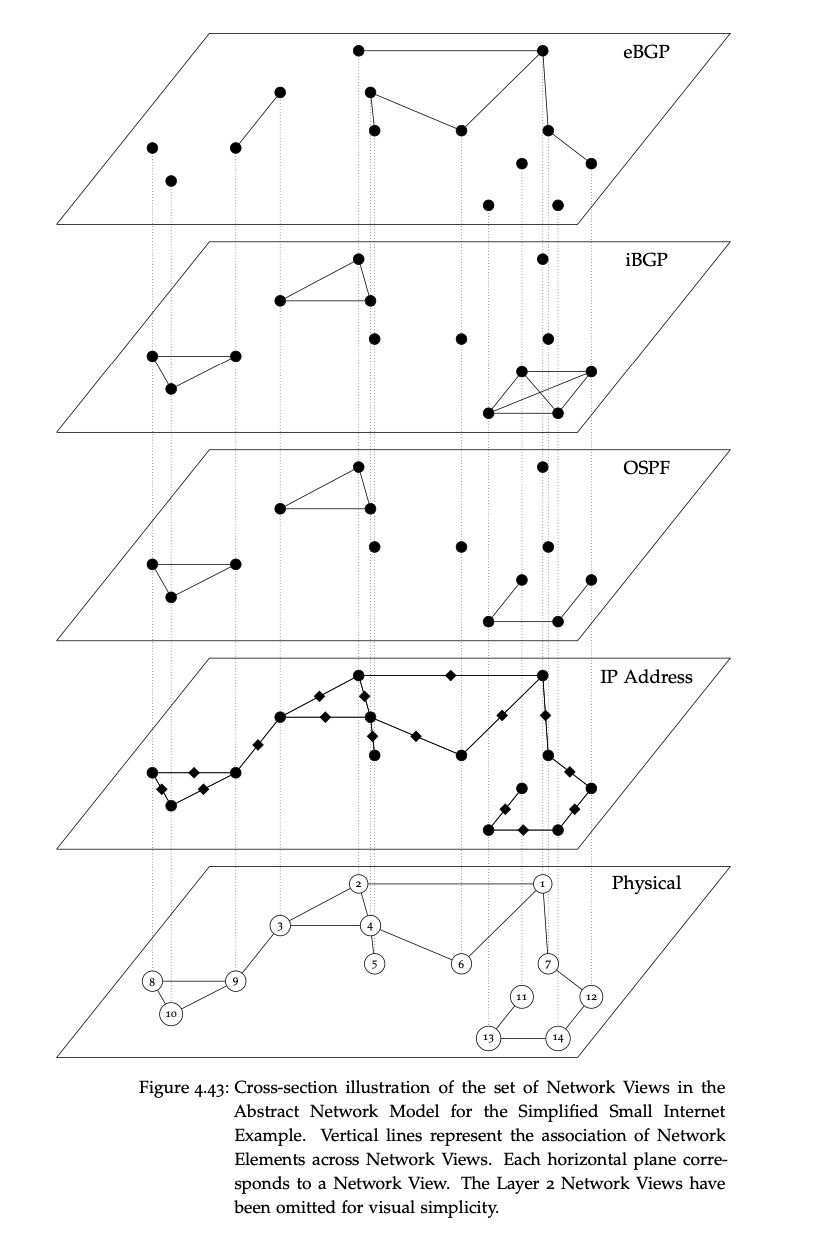
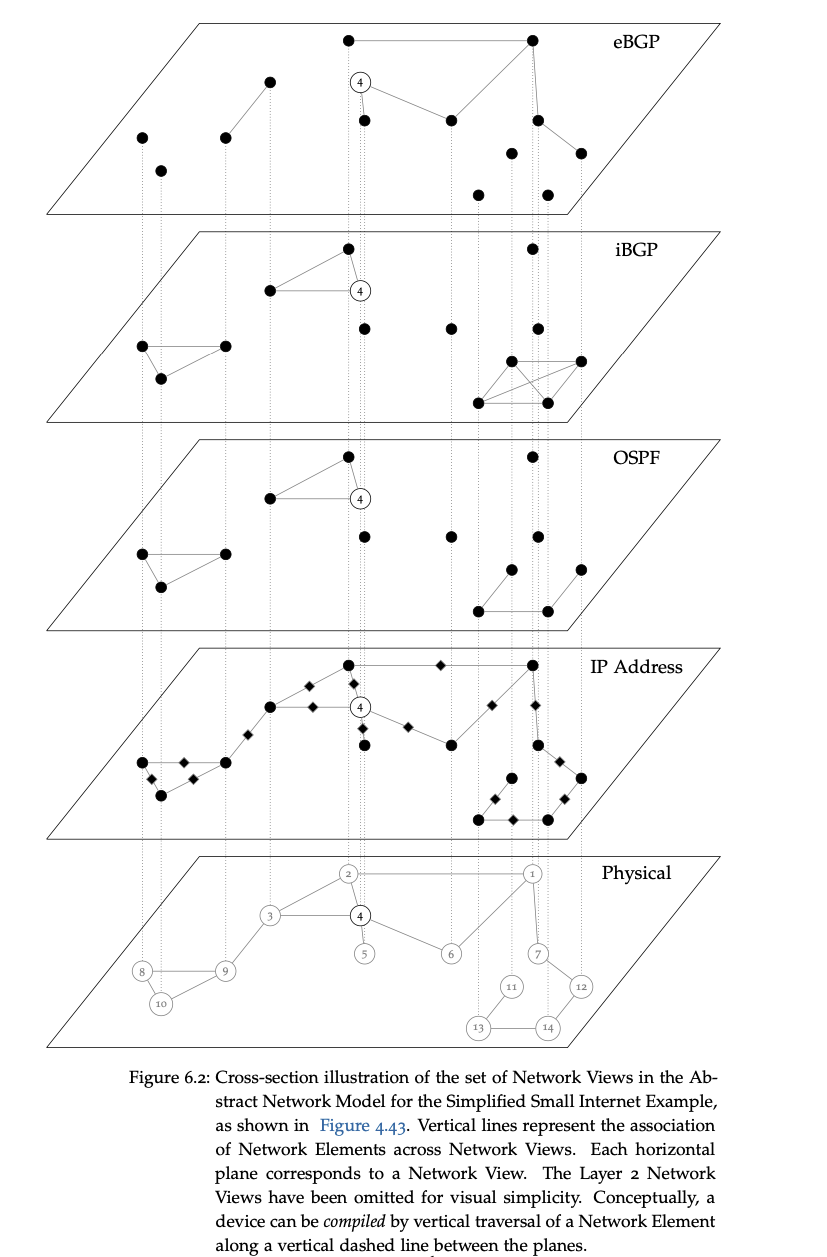
Architecture
AutoNetkit employs a multi-stage transformation pipeline:
- Specification Abstraction: captures the high-level design intent
- Intermediate Representation: a network-wide graph model that maintains cross-vendor consistency, separating design requirements from device-specific implementation
- Device Specialization: transforms the abstract model into device-specific protocol state through explicit, reversible compiler passes
- Template Assembly: generates final CLI commands using verified vendor templates with deterministic ordering for diff-friendly output
Features
- Automated IP addressing: loopback and link subnet allocation across protocol layers
- Protocol orchestration: OSPF areas, IS-IS levels, BGP peering (iBGP/eBGP) generated from design intent
- Multi-vendor output: Cisco (IOS, XR, NX-OS), Juniper (JunOS), Arista (EOS)
- Multi-target backends: vendor CLIs and structured formats (JSON/YAML) for tooling and audit workflows
- Visual feedback: topological diagrams for verifying physical and logical structure
Quick Facts
| Status | Recently Updated |
| Stack | Python, Polars |
Current Status
2026-03-01 — executed (batteries_included module: datacenter, WAN, campus, ISP topologies)